Choose how often a prayer comes up
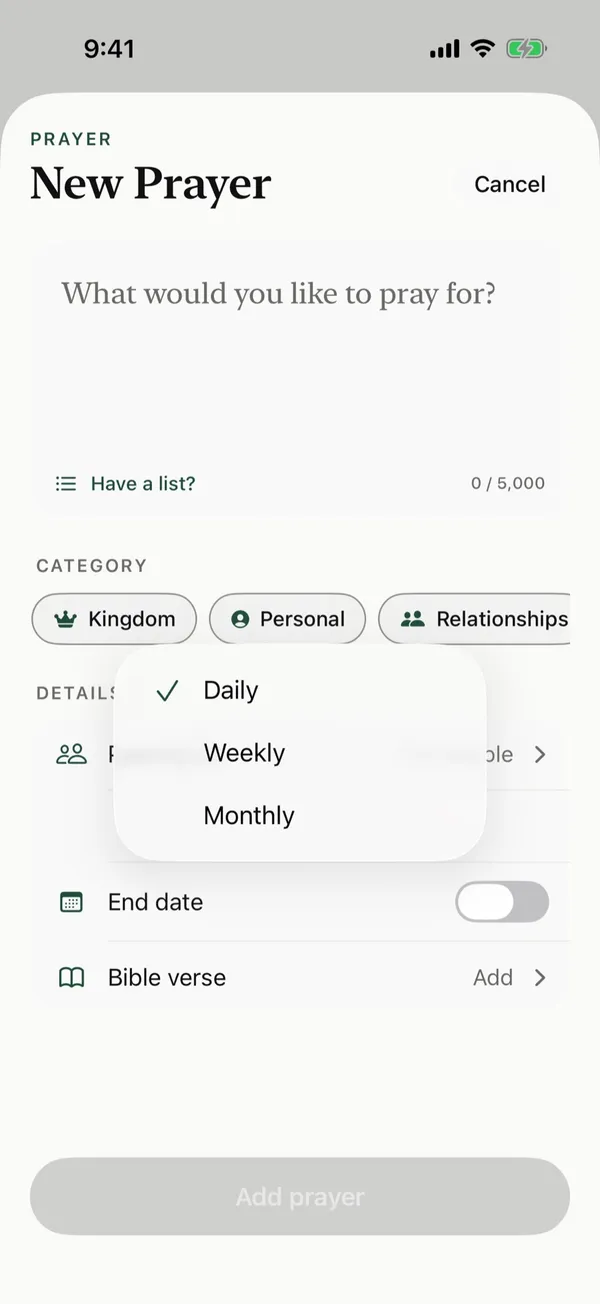
Set each prayer card to come up daily, weekly on the day you pick, or monthly on the dates you pick.
Steps
- Start a new prayer card with New prayer card, or open one from Manage.
- Under Details, tap Repeat.
- Choose Daily, Weekly, or Monthly.
- For Weekly, tap the day of the week. For Monthly, tap each date you want, from 1 to 31.
- To stop praying for it on a set day, turn on End date and pick the date.
- Tap Add prayer, or Save if you're changing a card you already have.
What happens each day
Each day, Today on Home lists the prayer cards that are due. A weekly card comes up on its day, and a monthly card comes up on each date you picked.
Posts about this
- How often should I pray for something?How often should I pray for something? What Jesus taught about persistent prayer, which requests to pray daily, weekly, or monthly, and how to avoid burnout.
- How to pray for someone who lost a loved oneHow to pray for someone who lost a loved one, what to ask God for in grief, Bible verses for comfort, and ways to keep caring for them after the funeral.
- Prayers for teachers and students, for the whole school yearPrayers for teachers and students, a back-to-school and first-day prayer, Scripture to pray for teachers, and how teachers can pray for their students by name.