Tag people and text them
Tag people from your contacts on a prayer card, then send them a text to say you prayed for them.
Steps
- In a prayer card, tap Praying for under Details.
- If the app asks, tap Allow Access so it can show your contacts.
- Pick the people you're praying for. Their names show on the card while you pray.
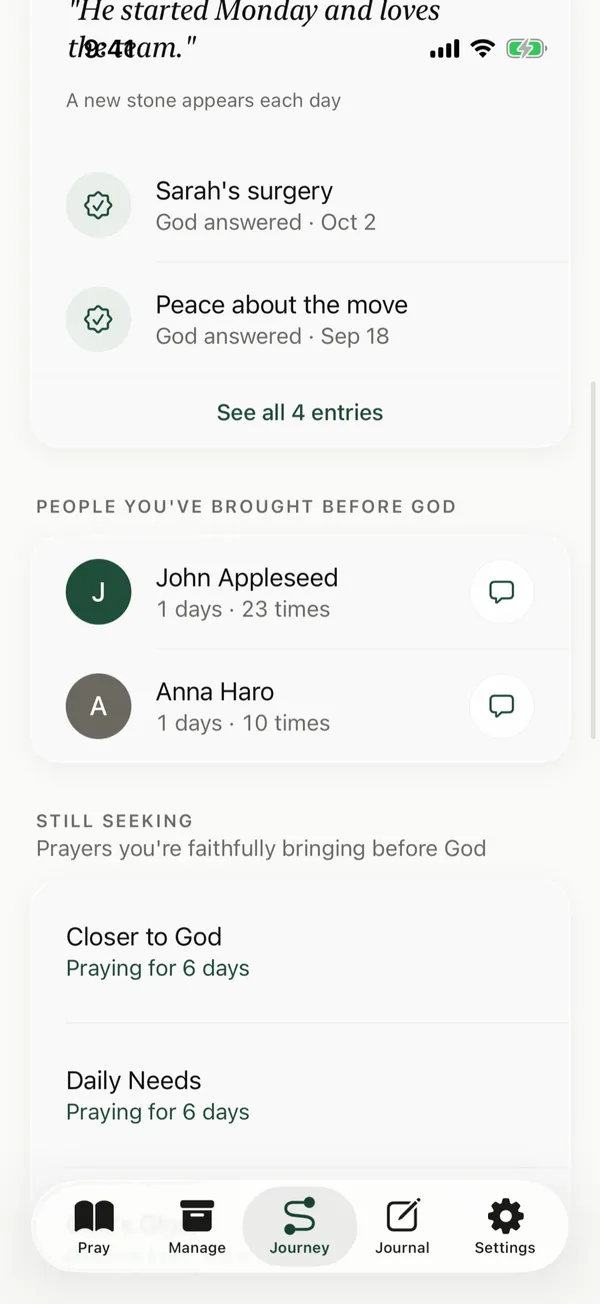
- To send someone a text, open Journey and find them under People You've Brought Before God.
- Tap the message button next to their name. Messages opens with their number, ready for you to write.
Good to know
- When you finish praying, the summary lists the people you prayed for. Tap the message button next to a name, and Messages opens with “Hi Sarah, I prayed for you today.” ready for you to edit or send.
- Contact names you tag stay on your iPhone.
- The message button shows only for contacts with a phone number.
Posts about this
- How to pray for others, with examples from ScriptureHow to pray for others, one name at a time. What to pray, examples from the Bible, how to pray for people you don't know well, and how to let them know.
- Intercessory prayer, what it means and how to do itIntercessory prayer means praying for others. Learn what it is, examples of intercession in the Bible, and simple steps to pray for people every day.
- Praying for friends, what to pray and how to let them knowPraying for friends, what to ask God for, Scripture to pray for friends going through hard times, and simple ways to tell them you prayed.